
Browse the manual
Backups
Export your whole installation and import it through the browser. Move between SQLite, MySQL and MariaDB. Check scheduled backups and recovery.
On this page
For: owners and admins who need a full backup or want to move their installation. Where: Settings > Backups. Import from the setup screen of a fresh installation.
Export and import work in your browser. Neither needs cron, a queue worker, or an external service. Command-line tools are optional.
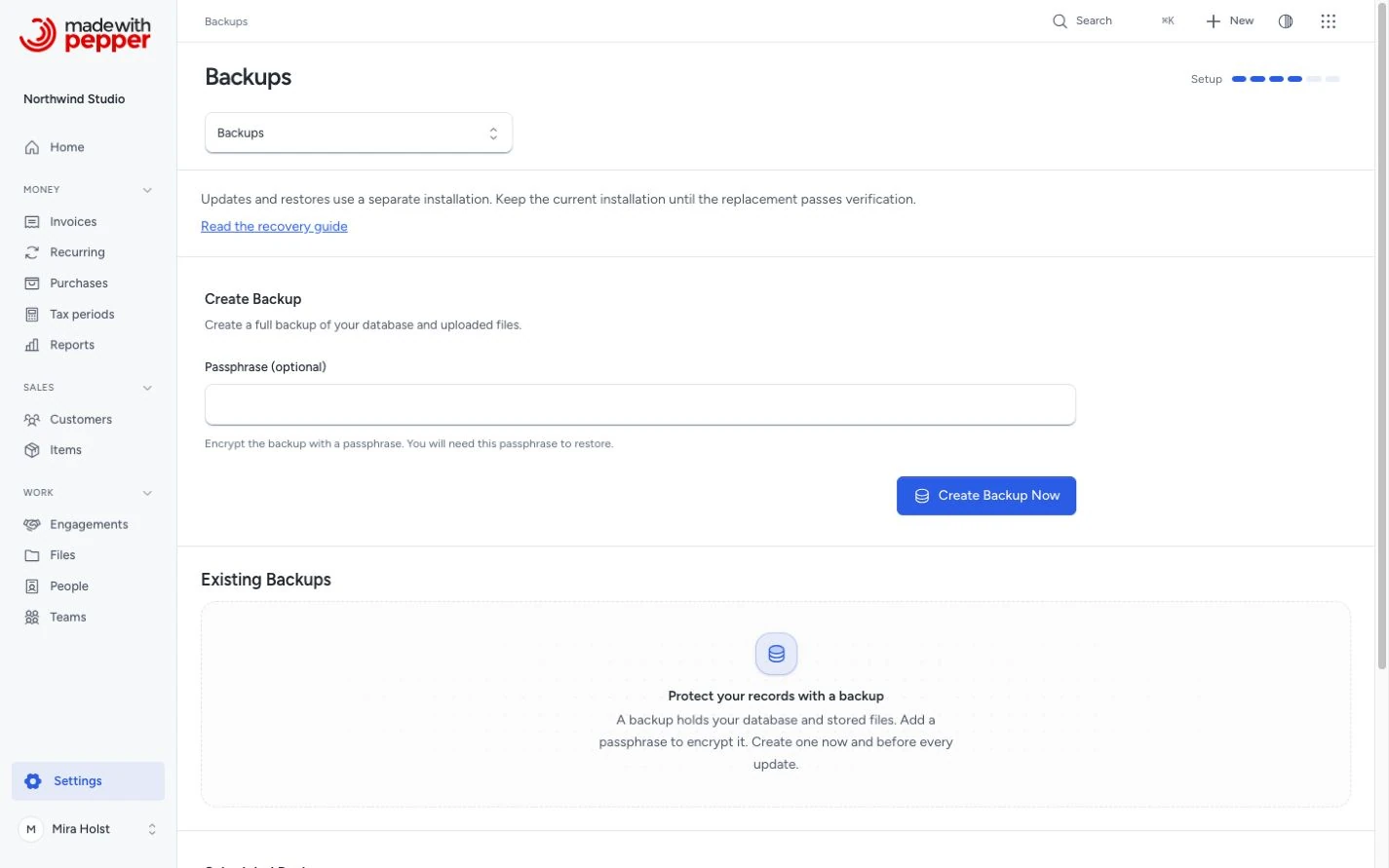
Creating a backup
- Open Settings > Backups.
- Enter a Recovery password of at least 12 characters.
- Click Export and download.
- Wait for the export to finish and the download to start.
- Keep the ZIP outside this server.
- Store its password in a separate safe place.
A current export contains the recovery key inside the encrypted ZIP. You need the file and its password to import it. The application cannot recover a lost password.
Existing backups
The list shows each completed backup, its creation time and size. Use its download button to save another copy. Delete removes that server copy after confirmation.
You need settings access to create, list, download and delete backups. Owners and admins have this access by default.
Scheduled backups
Choose Daily, Weekly, or Disabled, then save. Daily runs at 02:00; weekly runs on Sunday at 02:00. Times use your business timezone, shown on this page.
Scheduled backups need one cron job that runs every minute. Open Set up the scheduler for the entry to copy into your hosting panel. Use the PHP 8.4 executable your host provides. No queue worker is needed.
After setup, return here and refresh after a minute. The status shows an observed scheduler run:
| Status | What it means |
|---|---|
| Scheduler not observed yet | No scheduler run has reported from this installation |
| Scheduler is checking in | A run reported within the last 5 minutes |
| Scheduler check-in is overdue | The last report is older than 5 minutes |
The page also shows the last successful backup and the latest failure. It does not inspect your host’s crontab or guarantee the next run. If reports stop, ask your host to check the command and PHP version.
Scheduled ZIPs have no password protection. Keep them private and copy them off the server. Save the original APP_KEY from .env in a separate encrypted secret store. You need that key to import these backups.
Keep last N backups accepts 1 to 100; the default is 5. Successful scheduled and command-line backups apply this limit. Browser exports do not remove older copies. Retention removes recognized ZIPs, never records or issued originals.
What backups include
A full export includes every application table and the durable private and public files:
- Customers, work, invoices, purchases, payments, currencies, numbering and tax settings.
- People, roles, permissions, teams, comments and history.
- Forms, custom values, saved views and their records.
- Files, all stored file versions, logos, and issued PDF and XML originals.
- Audit and delivery history, connections and encrypted application data.
The manifest records the version, schema, snapshot time, file sizes and hashes. Import checks every table, row, relationship, counter and durable file before activation.
New exports use portable format 3. They can move between SQLite, MySQL and MariaDB. Import accepts the same version or an older version supported by the destination release. Older authenticated format-2 SQL backups need their original database family and separately saved application key.
What backups do not include
An export excludes application code, .env, server configuration, temporary setup state and uploaded update packages. Keep the matching trusted application package. Configure the destination’s database, address and email separately.
The recovery key is included only in current password-protected exports. Scheduled, unencrypted and older backups require the original key separately. Never put the key in a public folder.
Downloading backups
The initial export starts a download after creation succeeds. You can download it again from the list. A file on the same disk does not protect against disk failure.
Server requirements
Use PHP 8.4+, ZIP support and the database extension for your chosen engine. SQLite needs pdo_sqlite, SQLite 3.44+ with JSON support, and private local writable storage. MySQL and MariaDB need pdo_mysql.
Portable export, import and current update safety snapshots need no database command-line tools. The updater needs proc_open() to check the staged application. Older SQL recovery needs proc_open() and the matching mysql/mysqldump or mariadb/mariadb-dump tools. Check the backup and server requirements before updating.
Limits: 50,000 archive entries, 2 GiB expanded data, 1 GiB per file, 16 MiB per database row, and a 2 MiB manifest. The database stream counts as one file. Import needs twice the expanded size plus 16 MiB of free staging space, in addition to the restored database and files. Symlinks are refused.
The browser shows your host’s upload limit, capped at 256 MiB. For a larger ZIP, use the private-file option below. A failed export never appears as a completed backup.
Restoring from a backup
Keep the source and the backup. The destination must be a separate directory with an empty database and empty media folders. Import never merges with or overwrites an existing installation.
- Upload a trusted application package that supports the backup’s version.
- Open the new address in your browser.
- Complete the Setup token check using your hosting file manager.
- Choose Import a backup on the requirements screen.
- Select your ZIP and enter its recovery password.
- Choose SQLite, or enter an empty MySQL/MariaDB database connection.
- Click Import and verify.
- Wait for Verification passed.
- Check the snapshot time and the verified record and file counts.
- Confirm that you want to use this snapshot.
- Click Open this installation.
- Sign in with an account from the backup.
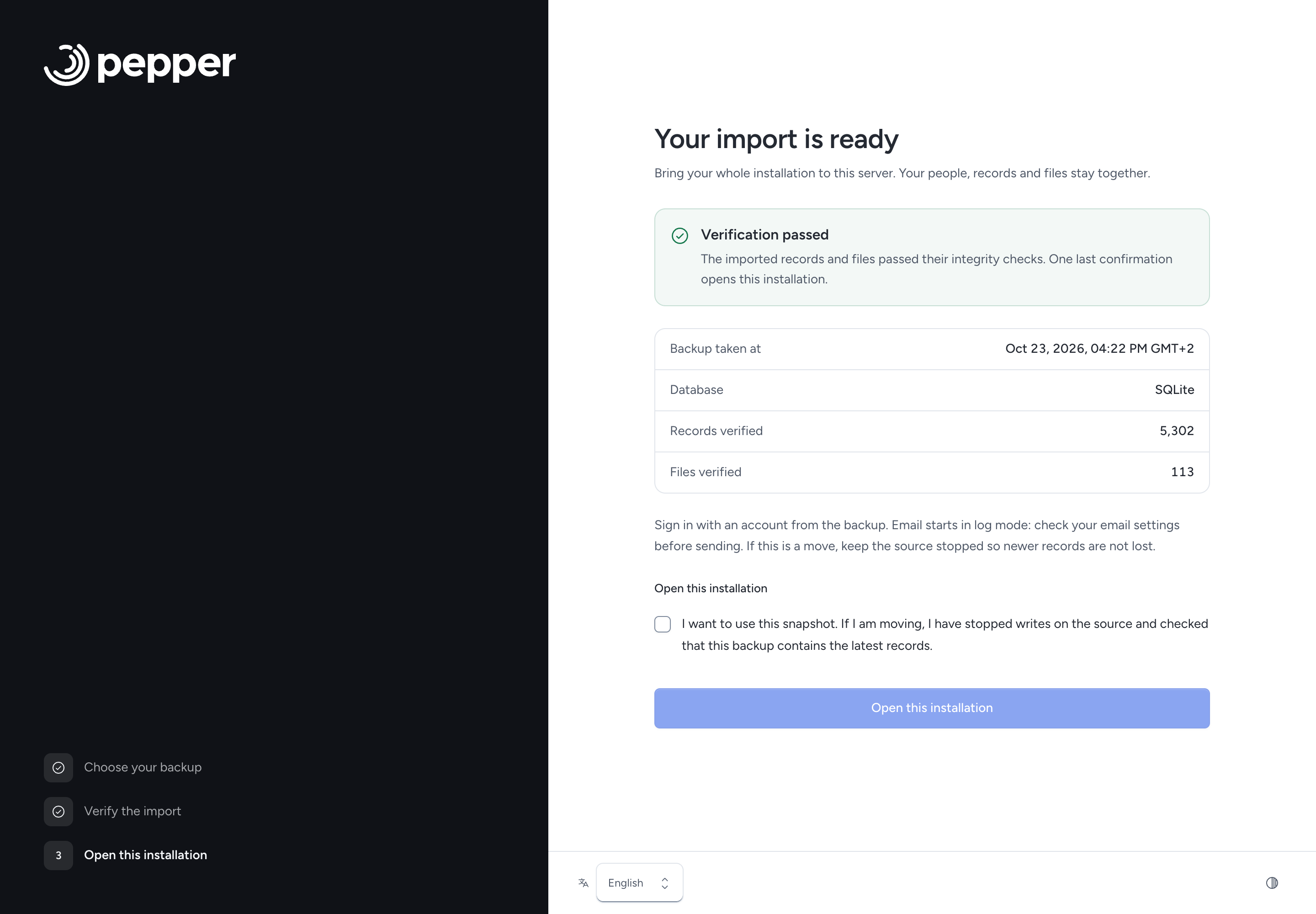
Do not complete the normal new-installation wizard first. That creates records and makes the destination ineligible for import.
For an older or scheduled backup, open Older or scheduled backup. Enter the source installation’s original APP_KEY. Use the same database family for an older SQL backup.
For a large ZIP, open Backup too large to upload?. Use your hosting file manager or SFTP to place it in storage/app/private/installation/incoming/. Click Refresh files, select it, then continue in the browser. No shell command is needed. Use a filename such as recovery.zip with no directory path.
After import, email starts in log mode. Check email configuration before sending. Enable scheduled tasks only when you intend this installation to run them. Check your logo and other public uploads too.
Import an older backup into a newer version
Use a fresh copy of the newer application package. The destination release must list the backup’s version as a supported starting point. Import restores the older data, applies the destination’s updates, and verifies the result before activation. You do not need to install each intermediate version.
SQL backups need their original database family and application key. Portable exports can also change database family when the destination supports the backup’s starting version.
A newer destination does not make every old archive compatible. Pre-refactor backups, unknown versions, changed migrations and newer-to-older imports are refused. If the package does not support your backup, obtain a compatible release from support. Keep your source and ZIP intact.
Restore risks
An online backup captures a point in time. It does not include later changes. Before activating an older snapshot, account for missing invoices, payments and other records.
Wrong passwords, changed files and incompatible versions refuse. The source stays unchanged. If import stops after it creates data, the destination stays isolated. Keep it for diagnosis and use another empty destination. Never clear a working installation to retry.
If activation cannot save configuration, the verified import stays available for a retry. If the browser loses its final response, open the destination again. A completed import opens sign-in.
How to test restore safely
Use a separate directory, empty database and a different address. Import a copy of the ZIP. Leave email in log mode and scheduled tasks disabled. Check records, balances, file versions and original downloads before relying on a backup.
Final snapshot and cutover
For a move, agree a time when nobody changes the source. Stop integrations, scheduled tasks and workers. Wait for running work to finish.
With other writers stopped, the administrator can make the final browser export. Do not create or edit records after that export. Keep the source stopped while importing and checking the destination.
At activation, confirm that the selected snapshot contains the latest records. Point your domain at the verified destination through your hosting panel. Configure its email and scheduler. Check sign-in and public uploads.
If the source receives a new record after export, take a new final export and use another empty destination. Once people write to the destination, do not switch back to the older source.
Operators who can stop all HTTP requests can record a sealed snapshot with the optional command below:
php artisan backup:create --sealed --confirm-drained --encrypted
This requires maintenance mode. The confirmation records your assertion that requests and jobs have drained. The application cannot prove those hosting conditions.
Encryption
Browser exports require a recovery password. Every ZIP entry uses AES-256 encryption, including the recovery key. Keep the password apart from the ZIP.
Scheduled backups are unencrypted. Restrict access and protect the off-site copy. The optional command php artisan backup:create --encrypted asks for a hidden password. Avoid putting passwords in command arguments.
Shared-hosting permissions
PHP needs write access to private backup and staging folders. Import also needs a new application directory and empty database. SQLite creates a private file at storage/database.sqlite; do not place it on a network share or inside public/.
Use your hosting file manager for setup proof and larger archives. Ask your host to set the document root and public-media link if needed.
Permissions
Only people with settings access can export. Fresh import requires the same hosting-possession proof as setup. Keep private storage, keys and backups outside the public document root.
Replacement updates for server operators
Normal updates use Settings > Update. Database and file changes in each release must preserve full export/import compatibility.
Fresh browser setup can import an older backup and apply the newer release’s updates in one step. The release must support that backup’s version. Keep the source stopped until you verify and activate the replacement.
Verify the release
Download from the trusted purchase or support channel. The optional php artisan release:verify /secure/release.zip checks file integrity and compatibility. It does not authenticate the publisher. Never use a damaged package or continue after a failed check.
Prepare the replacement
The browser procedure above is the normal recovery path. Shell operators can instead configure a separate empty installation with the original APP_KEY, destination database and MAIL_MAILER=log. Keep scheduled work stopped. Run php artisan down, then php artisan storage:link. The link must point to this installation’s own storage/app/public directory.
Restore and migrate
The optional same-version commands are:
php artisan recovery:restore /secure/backup.zip --encrypted
php artisan recovery:verify
The CLI requires the original APP_KEY in the destination configuration. Omit --encrypted for a plain archive. These commands leave maintenance enabled.
For a supported older backup, use:
php artisan recovery:restore /secure/backup.zip --upgrade --encrypted
php artisan recovery:verify
This works for portable format 3 and authenticated format-2 SQL backups. SQL backups still need their original database family. The command restores the source schema before it applies the target updates. Omit --encrypted for a plain archive. Unsupported starting versions refuse before import.
Verify and switch
After a successful CLI verification, inspect the records and files. Configure email and traffic. Run php artisan up only when the destination is ready. Keep the source stopped.
Recovery after a failure
A failed verification never grants activation. Preserve the failed target and its diagnostics. Use another empty destination after correcting the cause. Do not overwrite a source or newer destination.
Custom code and backups
A backup contains data, not custom application code. Keep your code and matching migrations separately. Import refuses a different schema. Test custom changes and complete recovery in disposable environments.
Related pages
Need help with the product?
Contact support