
Browse the manual
Feature overview
Everything Pepper includes and what it does not. Quick reference for buyers and evaluators.
On this page
Use Pepper to connect customers, leads and deals, boards, agreed work, business documents and money. The manual sidebar groups task instructions, concepts and administration.
Documents
Four document types, each with its own numbering sequence:
| Type | Purpose | Accepts payments |
|---|---|---|
| Invoice | Standard sales invoice | Yes |
| Quote | Quotation or estimate, with customer acceptance link | No |
| Pro-forma | Preliminary invoice before delivery. Convert to invoice creates a linked draft invoice, once | No |
| Credit note | Credit against an issued invoice. It lowers the invoice's balance due and takes refunds | No |
All types share the same sheet, tax calculation, and PDF generation. Create, edit and detail are one sheet with a readiness checklist. Review and issue names the expected number, the customer and the total before Issue assigns the number. Issuing sends no email. Each document register has status tabs, search, grouping, sorting and a row inspector. → Invoices, Quotes, Pro-formas, Credit notes
Sales: leads, deals and the pipeline
Collect enquiries in a leads inbox by hand, from a CSV file or from a form or website widget with the Lead target. Each lead records how it came in; its marketing source is kept only when known. Qualify a lead into a customer and a deal in one step; the duplicate check names customers with the same email or a similar name. Deals move through the stages you set up, with a probability and an idle limit per stage. Won and Lost are outcomes with a reason, not stages.
A linked quote is the deal's value, before tax, in its own currency; until then the owner's estimate shows as an estimate. Accepting the quote marks the deal won once; a won deal offers to open a project with the quote as its agreed scope. Every open lead and deal carries one next step, and Home lists the ones that need you under Follow up. The overview gives the open and weighted pipeline per currency, won in the period, the win rate and days to Won, with the same figures in the CSV export and the agent tool. → Leads, Deals and the pipeline
Customers and items
- Customer records with contacts, billing/shipping addresses, VAT numbers, and document history. New customer on a document sheet creates one with a name and a type. List views by status, type and tag. Owners, admins and accountants see each customer's payment rhythm and balance due per currency. CSV import and export. → Customers
- Item catalog with prices, tax rates, categories, and unit types. CSV import with column mapping and a preview, and CSV export that spreadsheets cannot run as formulas. → Items
Payments and reminders
- Record full or partial payments on invoices, up to the balance due. Pepper updates the status automatically (Issued → Partially paid → Paid). Recording a payment sends no email. Reverse a payment recorded by mistake; it stays in the history. → Payments
- Credit notes lower the balance due of their invoice. Credit owed exists when the payments plus the credit notes are more than the total plus the refunds. Then you can record a refund on the credit note. Reverse a refund recorded by mistake. → Credit notes
- Automatic and manual payment reminders with four stages and per-customer overrides. A reminder asks for the balance due and goes to the contacts with Receives reminders. Automatic reminders start after you email the invoice or record its delivery. → Reminders
Recurring invoices
Schedule automatic invoice generation daily, weekly, or monthly. Optional auto-send through the email outbox, with the Invoice send template. Catch-up behavior prevents bursts of back-dated invoices. → Recurring invoices
PDF generation
Three built-in templates (Modern Minimalist, Classic Corporate, Warm Craft), customizable brand color, logo positioning, and per-invoice template overrides. Each prints in 14 language variants, including European and Brazilian Portuguese. Arabic has right-to-left layout; Japanese and Chinese use a bundled font. Pepper stores the first PDF after the issue as the issued original, with a SHA-256 fingerprint. Later settings changes apply to new documents only.
Download current copy adds the payments and credits. Issued EUR invoices with a bank account that has an IBAN get an EPC QR code. It asks for the total on the original and for the balance due on a current copy. → PDF branding
UBL XML export
Export issued invoices and credit notes as local UBL 2.1 files for the Peppol BIS Billing 3.0 profile. During development, the Pepper team checked the generator against the official Peppol BIS Billing 3.0.21 rules. Before it writes a file, Pepper checks the document and lists what to fix. The export supports currencies with 0 or 2 decimals. Pepper does not send files over Peppol or submit them to government portals. A receiver can apply its own rules. → UBL XML export
Send documents by email with the issued original PDF attached. An outbox retries temporary failures. Each document shows its delivery state: Not emailed, Emailed when the mail server accepted it, Email failed or Email result unknown. Record delivery records a delivery by post or another way.
Four email templates in each of the 14 language variants, with an HTML and a plain-text part. Pepper does not send payment receipts and does not track opens. SMTP or Resend API for email delivery. → Email delivery, Email templates
Reports
A reports overview with the payments of each day in a month calendar and each open invoice as a line from issue to due date. Tax report, aging report, customer statements, and invoice CSV export, each with CSV download. The tax report, customer statements, and invoice export have period filters. The aging report has no period filter and shows balances as of today. The tax report, aging report and customer statements each show one currency, which you choose, and name the other currencies with records. The invoice CSV export lists every currency. → Reports
Settings and setup
The settings overview shows which business details are still missing. Settings cover company identity, numbering, tax rates, PDF branding, localization and email delivery. Bank accounts support an IBAN or a local account number and routing code.
The interface, PDFs and emails support 13 languages with 14 variants, including both Portuguese variants. Choose from 26 regional options for default notation and save a personal display preference. Pepper supports 23 currencies and keeps their balances separate. → Setup
Administration
Manage four built-in roles, custom roles and limited guest access. Configure two-factor sign-in and OpenID Connect SSO. Review the audit log and schedule database and media backups with retention. Manual backups support encryption.
On the Update page, upload the release ZIP. Review the checks. Confirm installation to start the update with its automatic backup and failure rollback. → Users, Audit log, Backups, Updates
Installation health names local problems and the next step. Home and the Inbox show new failures once per failure period.
The expanded audit log records actions and sampled reads. Check history integrity, export signed evidence and review a data-subject report. Only the owner can confirm personal-field erasure. Issued originals and financial figures stay unchanged. These controls do not certify legal compliance.
Home
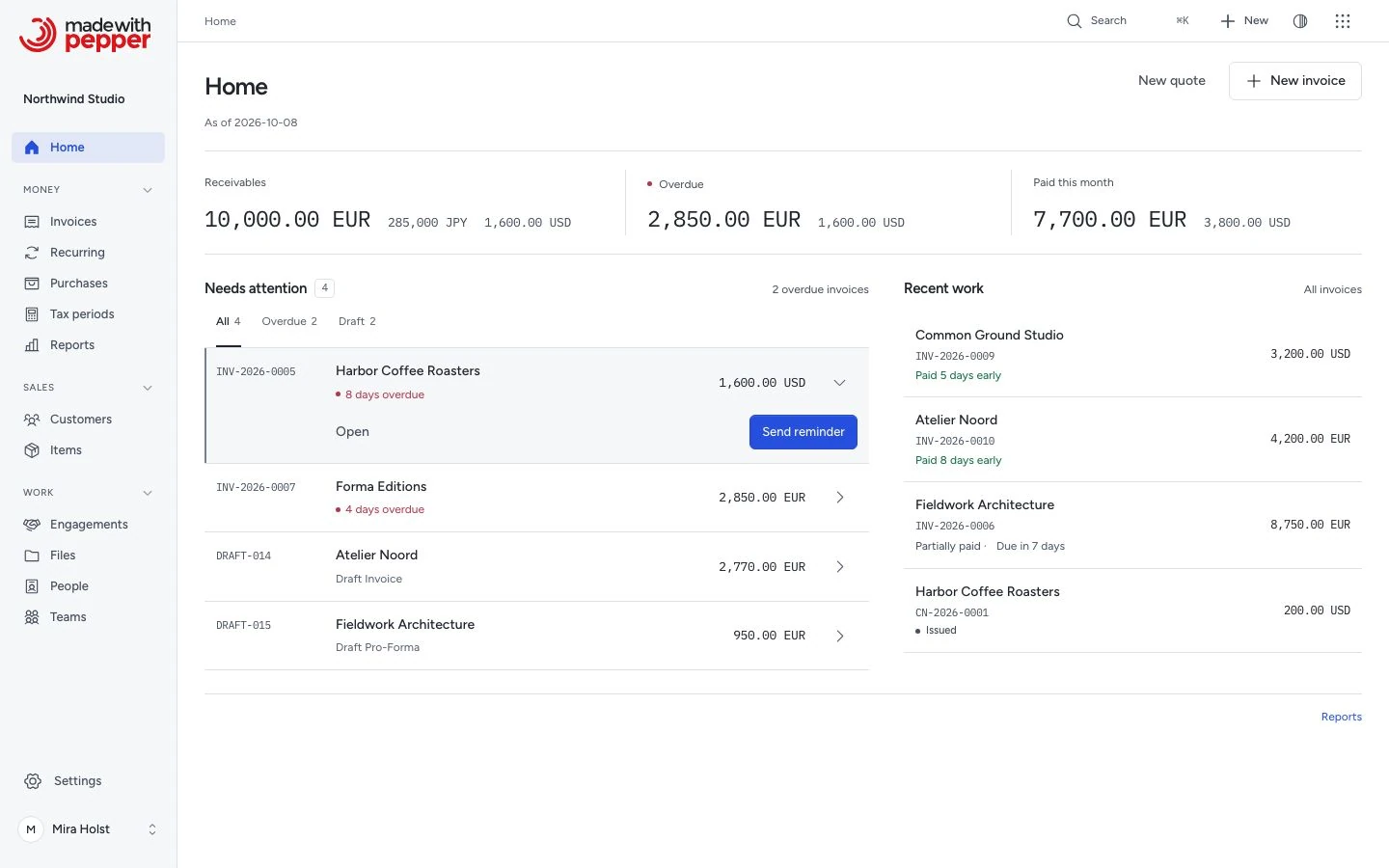
Home shows one money band: Cash in with a six-month chart, Owed to you by age, Quotes out and Unbilled time. One line of figures follows for the other modules you use, then Needs attention and Recent work. One currency shows at a time. Guests and people without document access get a Home with their own work. New installations show first steps. Reports hold the detailed financial analysis, charts and customer comparisons. → Home
Interface
Every screen has the same navigation: a rail from 1024 px wide, and a tab bar with More on smaller screens. It shows only the places your role may open. Search (⌘K or Ctrl+K) finds documents and customers.
Everything groups its pages as Money, Sales, Work and Customer services. Focused desks keep their own page lists and order.
Keyboard shortcuts work on every screen. / opens search, N starts a new item for the current page, and ? shows the list. G then H, I or C goes to Home, Invoices or Customers.
Every record in a list, board card, file and comment has a … menu with the actions your role allows. Right-click, the menu key, Shift+F10 or a long press opens the same menu at the record. → Use a record's menu
The interface has a light and a dark theme and a right-to-left layout for Arabic. Its fonts and Phosphor icons ship with the package: Figtree for the interface, with IBM Plex Sans Arabic and IBM Plex Mono. Every interactive screen is a React page. → Navigation, Keyboard shortcuts
Agent connections and MCP
The built-in Assistant uses your selected tools to prepare business tasks. Every write needs a confirmation card. Sensitive steps keep their separate human approval. The owner configures Anthropic, OpenAI or an OpenAI-compatible provider and controls limits and local history. Without configuration, the panel is absent and makes no generation requests. All apps work without AI. See Assistant setup.
AI is optional. Documented jobs prepare invoice drafts, explain overdue balances, show customer context, work with Sales and record project time. You confirm invoice issuance. The AI-client guide lists the tested versions of MCP Inspector and FastMCP CLI and gives example requests. These are scripted MCP tests, with no model calls.
Every app declares its tools or a stated exclusion. Settings > Agent connections > Apps and access shows the available tools and the actions that stay in Pepper.
MCP and HTTP tools let clients read permitted records, preview exact totals and make the everyday changes of each app as the person they act for: drafts of every document type, leads and deals, tasks and time, boards and cards, files and folders, comments and the inbox, forms and custom fields, booking schedules and analytics goals. Files arrive and leave through single-use uploads and downloads. Each change shows in the record's activity as done through the connection. Sensitive steps, such as issuing or sending a document, recording a payment, changing settings, publishing, deleting or exporting, run only after the delegated person approves the exact change. → Approve sensitive steps. Access starts off. Only the owner can connect clients. Guests cannot hold connections.
The owner chooses an active staff delegate, permitted access and an expiry of 1–30 days. Clients use a pasted credential or OAuth browser sign-in. Each call checks the delegated user’s current permissions and record access.
Issuing needs the delegated person’s approval of one invoice. The client then executes within the approval window (10 minutes from preparation unless the owner changes it). Issuing freezes the invoice and assigns its number. It sends no email and records no payment. No model account is required. → Connection setup, MCP and HTTP reference
Forms and custom fields
Build forms with 14 field types, sections and conditions. Keep submissions, private uploads and consent.
Public forms show your business name and logo, with an optional Pepper attribution link. Confirmed receipts keep that identity.
Public forms collect responses. Internal forms can also create or update customers with the submitter's permissions. A configured form can add each response to a board card. The destination board controls access to routed responses and their files.
Add custom fields to registered record types. Use exact values in views, filters, search, plain-text merge previews and agent reads.
Agent preparation returns editable input for ordinary browser confirmation. It performs no write. See Forms and custom fields.
Widgets
Configure a response-form widget and paste its code into an existing website.
Allow exact website origins, choose appearance and language, then publish. Internal forms use a separate sign-in window with third-party cookies blocked.
Business cards, team pages, price lists, button launchers and counter offers extend the available form service. Each service also has its own page address. Named placements provide stable links and printable QR codes.
Visitors can save a contact, send a message or request a quote from catalogue items. Each message or quote request keeps its own source and recipient.
Keep form responses, private files and consent in the ordinary records. Read the widget guide for publication, print and limits.
Menus, estimates and service areas
Publish menus with business-entered marks and serving hours. Receive catering requests, offer cost estimates from typed answers, or check service areas against your postal-code list. Requests keep the version and details the visitor sent. A menu PDF is a dated snapshot; replace it after prices or marks change.
Listings
Publish properties, vehicles, rentals and vacancies through a single-listing widget or a collection. Choose the public address detail, keep price history and receive enquiries, appointment requests or private applications. Visitors can compare up to four listings and opt into alerts for new matches. Staff make each appointment and application decision. Read listings and requests.
Widget analytics
Compare placements, channels and periods on your own installation. Open exact results to see permitted records, set count targets and save report views. Trace explicitly linked leads, accepted quotes, invoiced revenue and recorded payments by source, with first and last touch kept separate and money shown per currency. Audience measurement starts off. Standalone responses are counted on the server; browser and embedded activity need permission for each page load. Pepper does not identify anonymous visitors across loads. Read widget results.
Online payments
Connect your own Stripe account, share an issued invoice's payment link and record money after provider confirmation. Staff can issue a booking invoice for deposits or ticket prices. Credit-note refunds keep the incoming payment and record confirmed money out. Fees retain their own currency. Read setup and recovery.
Money overview
Compare revenue, selected purchase costs, result and recorded cash by month, quarter or year. Each currency stays separate. Open either period’s source records or download the figures as CSV. Read the dates, tax choices and limits.
Purchases and tax periods
Record supplier invoices and receipts with exact amounts and tax. Attach the file. The year overview shows months, quarters and the full year. Open a period to see sales and purchases by tax rate. Open a figure to see its records.
Download a ZIP and PDF for your accountant. See Record purchases and Prepare a tax period. It is not bookkeeping and files no tax return.
Projects and draft line order
Projects connect tasks, agreed milestones, tracked time and invoices. Choose fixed-price, hourly or mixed billing. Use the timer, weekly timesheet and time register, then review unbilled work for an invoice draft. Budgets, workload and margin state the records behind their figures. See Manage a project, Plan tasks and Bill tracked time.
Reorder the lines of a draft invoice or a draft quote. Drag a numbered handle, use Up or Down on it, or choose a move action from the line menu. Save the draft to keep its order.
The interface uses cool neutral surfaces, desktop navigation with text labels and clear headings. The application has fixed Pepper colors. Document branding stays separate. Financial states and Arabic layout keep their meanings in both themes.
Files, people and product access
Browse files like a desktop: folders and files in one list or grid, drag to move, select many and upload by dropping. Images open in one viewer with zoom and swipe. Text and code files open in an editor: Markdown, HTML, CSS, JavaScript, JSON, XML, YAML and more, up to 1 MB. Each save adds a version, and a newer version is never overwritten. Keep colleagues, teams, local working hours, recorded time off and their accounts in People. Store private hourly rates with start dates. Use offboarding to stop access and hand over open work. Account permissions still govern each record.
Every module is available after installation; roles decide who uses it. See Files, People and teams and Product areas and access.
Boards and cards
Create Private, Team or Workspace boards. Organize cards into lists with assignments, labels, dates, checklists, files and custom fields. Linked cards show the current state of records you may open. Moving a card never changes billing.
Boards shows boards you can open. My cards collects your assigned, due and watched cards. Owners and admins use Board access to recover access to boards, including private boards. Joining as admin requires confirmation, records activity and notifies the board admins.
Import Trello JSON, copy or archive a board, and export JSON or CSV. Invite guests to private boards with explicit access. See Boards and cards.
Comments and the inbox
Add comments to supported records, including boards and cards. Mention a colleague or a team, reply in threads and read mentions, replies, handovers and updates in Inbox. Choose a daily email per kind of notification. Live refresh keeps open work current. Optional in-app alerts and browser push cover mentions and assignments. Presence respects people and record access; Do not disturb silences alerts. Customer and project pages show the record's activity, and conversations show who else has the record open. Comments never appear on documents or in customer emails. See Comments and the inbox.
Views of your records
View customers, documents, items, purchases and projects as a table, list, board, calendar, timeline or gallery. Filter on the record fields with exact amounts, save a view for yourself or a team, and share the view link. Each person sees only the records they can open. Select records to mark customers active or inactive, archive items or delete drafts in one step; each record still goes through its own checks. See Views of your records.
Calendar events and work dates
Use Month, Week, Day or Agenda to plan events beside task dates, milestone deadlines, invoice and quote dates, bookings, Sales follow-ups and Doc reviews. Filter sources, projects and calendars. Source dates open their original records for changes.
Personal calendars stay private. Selected people and teams can read shared calendars; their owner edits events. Repeating events keep local times across daylight saving, with separate changes for one occurrence or the series. Saving sends no mail. Review exact invitations before sending and receive permitted reminders in Inbox.
Import or export ICS files and create revocable private feeds. Imported attendee addresses remain data only. Calendar does not provide CalDAV or outside-provider synchronization. See Calendar and Calendar tools.
Automations
Connect permitted work events or a local schedule to tasks, projects and reviewed actions. Use Flow or List to edit the same steps and condition branches. Save rules inactive, then activate them after review.
Each run uses its creator's current permissions. Issuing, sending and signed webhooks wait for exact human approval. Run history keeps step results and separates webhook acceptance from processing at the receiver.
Stop unfinished work without discarding completed results. Unknown webhook outcomes need a new review before another attempt. Read Automations and the 22 HTTP and MCP tools.
Need help with the product?
Contact support