
Browse the manual
Configure optional suggestions
Configure the optional TypeSafe provider, control disclosure, set usage limits, and test the connection with synthetic text.
On this page
For: the installation owner. You need your own TypeSafe account and API credential to test the connection.
Pepper includes these owner settings. Customer-data features remain inactive pending independent evaluation. Only the synthetic connection test is available.
Manual invoicing needs no provider account. Leave the provider disabled to make no classification requests, including connection tests or background health checks.
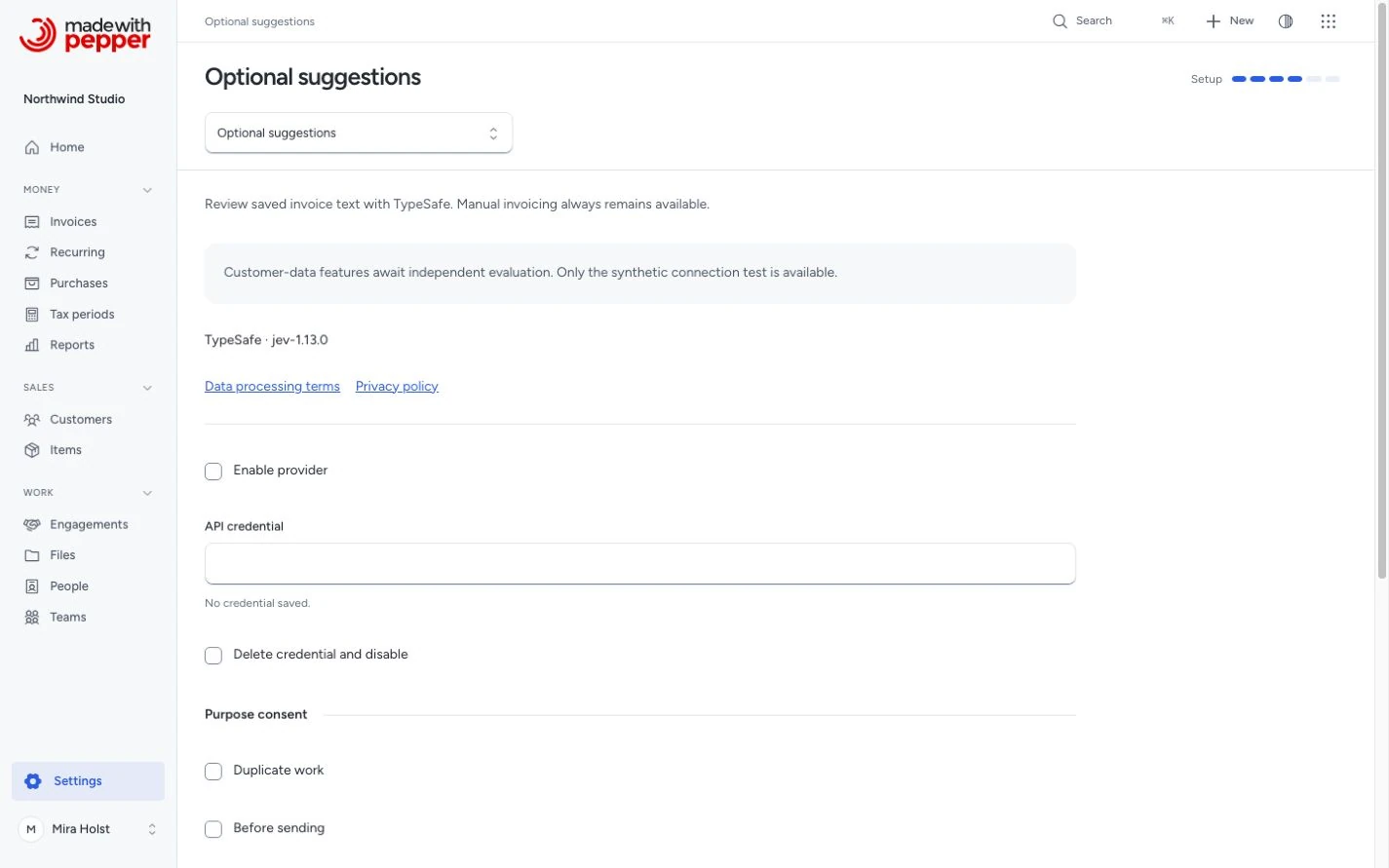
The page follows the fixed Pepper light or dark theme. Dark mode uses near-black surfaces. Your document brand color does not change these controls.
Configure the provider
- Open Settings > Optional suggestions as the owner.
- Read Data processing terms and Privacy policy.
- Enter your TypeSafe key in API credential.
- Set Daily call limit and Daily token limit.
- Select Enable provider.
- Confirm that you accept external processing under the linked terms.
- Click Save changes.
Admins, accountants and employees cannot read or change these settings. Pepper refuses their direct requests.
Pepper encrypts the saved credential on your server. The page shows whether a key exists without displaying it. Leave the field blank to keep it. Enter a new key to replace it. Validation errors never return the key to the page.
Purpose switches record consent for Duplicate work, Before sending and Reminder attention. They do not activate features that still await evaluation. This build displays no customer-data suggestion controls.
Test the connection
- Save the enabled provider and its credential.
- Click Test with synthetic text.
- Read the result below the buttons.
The test sends this fixed sentence: “This is a synthetic connection test.” It sends no customer, invoice or payment records.
A successful test confirms that the configured provider returned a valid answer. It does not measure suggestion quality or legal compliance.
A failed, unavailable or exhausted request shows Review unavailable. Continue manually. Check the saved credential and your provider account. A disabled provider makes no request. The button remains unavailable until you save an enabled provider and a credential.
Usage limits
| Control | Default | Range and behavior |
|---|---|---|
| Daily call limit | 100 | 1 to 10,000 calls, counted by UTC day |
| Daily token limit | 6,553,600 | 65,536 to 655,360,000 input tokens, counted by UTC day |
| Request reservation | 65,536 tokens | Every request must fit before it starts |
| Concurrent requests | 1 | Another request returns unavailable while one is active |
| Provider timeout | 2 seconds | No automatic retry |
Pepper replaces a reservation with validated usage after a response. Unknown usage stays charged. A crashed request keeps its reservation. A saved, unchanged result can be reused for up to 24 hours without another call.
The page shows today’s call and token counts. These limits do not guarantee a currency spending cap. Check current pricing in your TypeSafe account.
Three consecutive provider failures stop new calls for 5 minutes. After that, an explicit request can test the provider again. No background health polling occurs.
Disable or remove access
- Clear Enable provider to stop new calls.
- Select Delete credential and disable if you also want to remove the saved key.
- Click Save changes.
You can disable without accepting new external processing. Saving clears optional suggestion history and cached results. A response from an earlier configuration cannot create a new suggestion.
Disabling cannot retrieve data that already reached the provider. TypeSafe’s terms govern that data. This build does not promise zero retention or a specific processing country.
Pepper’s daily maintenance removes optional decision metadata older than 30 days. Explicit use also runs this cleanup. Keep the scheduler configured.
Optional history contains actor and record references, a protected input fingerprint, typed outcomes, usage and timing. It does not contain full request text or raw provider responses. Backup copies retain their contents until you remove those backups.
Invoices, recorded payments and issued originals remain unchanged when you disable the provider or clear optional history.
Related pages
Need help with the product?
Contact support