
Browse the manual
Localization
Choose language and region defaults, keep your notation overrides, and save a personal display preference.
On this page
Where: Settings > Localization Who: owner or admin for company defaults; each signed-in person for their own preference
Choose Language and region once to get its usual notation. Keep a different number, date, time or week setting when your business needs it.
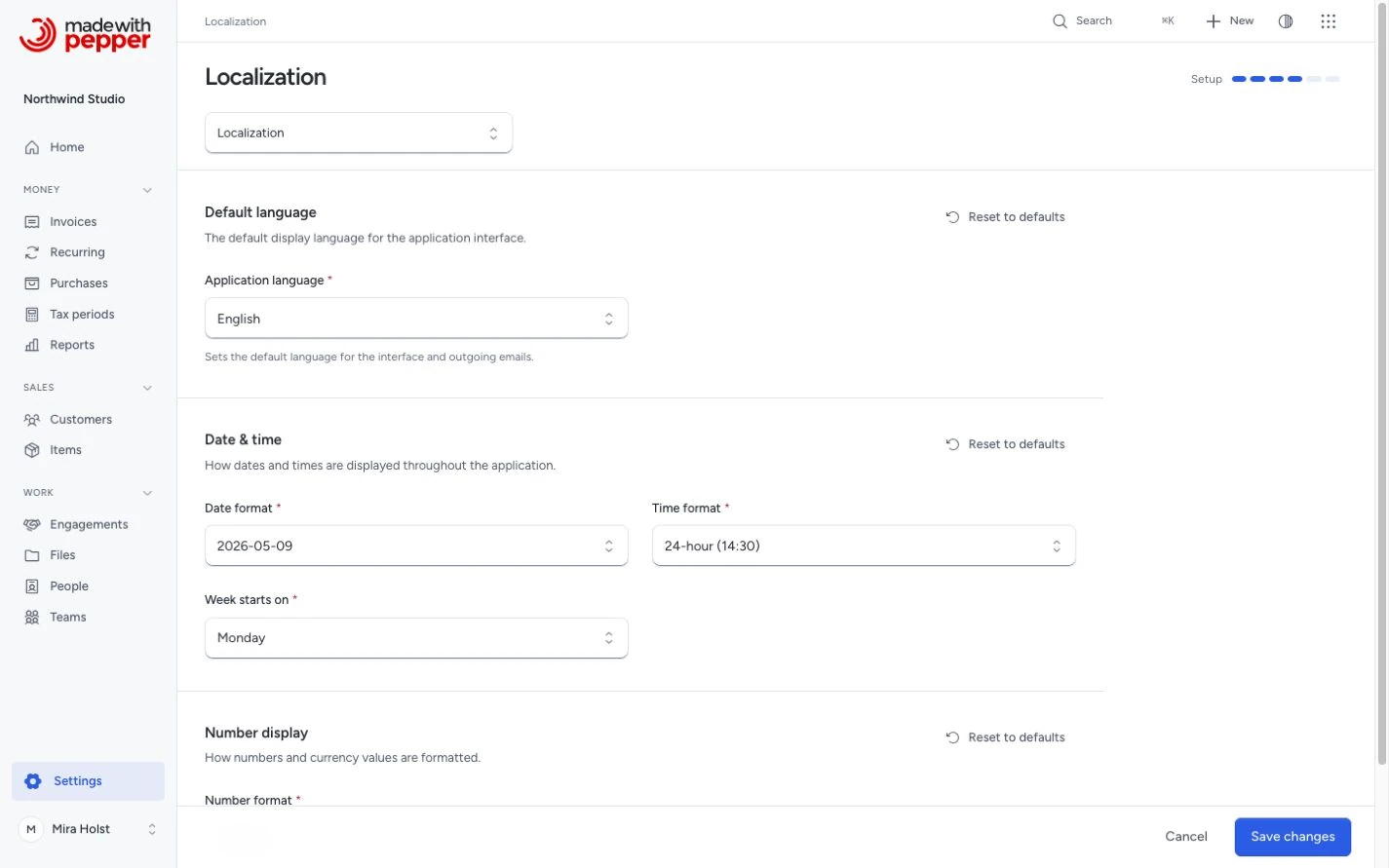
Set company defaults
- Open Settings > Localization.
- Choose Language and region, for example Deutsch (Schweiz) or English (United Kingdom).
- Check Date format, Time format, Number format and Week start.
- Change a value if your business uses another notation.
- Click Save changes.
Overridden fields show Default for … with the region’s value. The form shows examples for the selected notation. Swiss German uses 1'234.56 and 31.12.2026. British English uses 1,234.56 and 31/12/2026.
Saved overrides stay when you select another region. A notation value you edit in this form also stays when you choose another region. Existing installations keep all four saved notation choices as overrides after the update.
Save your region first. Then click Reset to defaults beside Date & time or Number display to use that region's defaults. Confirm the reset. Other settings stay unchanged.
The company region selects the company language for new documents when neither the customer nor the document specifies one. Changing the region never changes your company currency, saved amounts or finalized documents.
| Setting | Choices |
|---|---|
| Language and region | 26 regional choices across the supported interface languages |
| Date format | 2026-12-31, 31/12/2026, 12/31/2026, 31-12-2026, 31.12.2026 or a date with a month name |
| Time format | 24-hour or 12-hour clock |
| Number format | 1,234.56, 1.234,56, 1 234,56 or 1'234.56 |
| Week start | Monday or Sunday |
Save your personal language and region
Each signed-in person can save a display preference for their account. It changes their interface language and regional date and count display. Financial entry keeps the company's number format.
- Open Your profile.
- Under Your language and region, select a region.
- Click Save language and region.
The choice applies to later sign-ins on your account. Select Follow the browser and company defaults to remove it.
A language explicitly chosen in a browser remains first in that browser. Changing your personal preference here also applies its language to this browser. An AI client can save the same preference through profile.update; an existing browser choice still takes precedence there.
Your preference never changes company notation, currency, customer language or an issued document. If a save fails, the field retains your choice and shows the error. Correct it and save again.
Initial timezone
The installer defaults to UTC. The timezone you select becomes the application timezone, the company timezone, and your owner account’s initial display timezone. This applies to fresh installations; it does not change timezone settings or document dates in an existing installation.
An interrupted fresh installation keeps the selected timezone when you retry with the same setup target and owner. A personal display-timezone change after installation does not rewrite invoice issue or due dates.
How locale affects the app
- UI text: menu labels, button text, system messages and validation errors display in the selected language. A validation error names the field in that language
- Names in lists: country, currency and language names in the select lists use the selected language
- Date formatting: all date fields and PDF dates use the configured format. Formats such as
Jun 3, 2026include translated month or weekday names. The 12-hour clock also translates AM/PM. On screen, these use the interface language. PDFs, emails and the public quote page use the document language - CSV imports: the item and customer imports accept the words for yes, no, Active, Business and Individual in your interface language, besides the English words. See Import customers from CSV
- Number formatting: amounts on screen and in PDFs use the configured separators
- Number entry: prices, discounts, quantities, tax rates and payment amounts are typed in the same format. With 1.234,56 selected, type
1.234,56or1234,56; with 1,234.56 selected, type1,234.56or1234.56. A value in the other format is refused, and the form keeps what you typed so you can correct it - Login page: a language selector in the bottom-right corner lets users switch the interface language before logging in. See Languages
Supported currencies
Pepper supports international business records in 23 currencies: AED, AUD, BHD, BRL, CAD, CHF, CNY, DKK, EUR, GBP, IDR, INR, JPY, MXN, MYR, NOK, NZD, PLN, SAR, SEK, TRY, USD and ZAR.
Set your default currency in Company settings. Choose a currency for each new document before you add lines. Changing the company default does not change saved documents. Customer balances, reports and tax-period summaries keep currencies separate; Pepper does not convert them into one total. The USD purchase price is separate from your business records.
Supported currencies and languages do not establish compliance with every country's tax or e-invoicing rules. See the UBL export scope for supported standards and limits.
Currency decimals
Each currency has a fixed number of decimals: none for JPY, three for BHD and two for the other supported currencies, including IDR. Pepper saves the currency and its decimals with every document, recurring template, payment and catalog price. The number format setting changes only the separators, not the number of decimals.
An amount with more decimals than its currency has is refused: 10,5 on a JPY invoice, or 1,2345 on a BHD invoice. Quantities take up to four decimals in the selected decimal separator, without grouping, from 0,0001 to 99999999. Percentages take up to two decimals.
Document language
Each document has its own language. The PDF and the emails of the document use it. The interface language of the person who works on the document does not change it.
- On the customer form, set the Document language. Leave it empty to use the Company language, which is the Language and region above.
- A new draft or recurring schedule takes the customer's language. Under Language, Customer's language keeps that choice. Select another language to override it.
- When you finalize the document, Pepper freezes its language. It also freezes the number and date formats. A later change to these settings applies to new documents only.
Example: Northwind Studio in Utrecht works in Dutch. Its customer Globex GmbH has Document language German, and Pine Street Bakery in Portland has English. Globex gets a German PDF for its €4,840.00 invoice. Pine Street gets an English PDF for its $2,598.00 invoice. Both PDFs use the number format saved at issue.
Email templates exist per language. See Email templates.
PDF languages
All three PDF templates print in the 14 language variants, including both Portuguese variants. Every label is in the document language, including the tax label and the country names.
- Arabic: the PDF is mirrored. Columns, totals and alignment read from right to left, and Arabic letters are joined.
- Mixed text: each typed field takes the direction of its first letter. An Arabic customer name in an English invoice reads correctly.
- Japanese and Chinese: Pepper uses the bundled Droid Sans Fallback font. Long text without spaces wraps inside its column.
Limits:
- Kanji use Chinese-style glyph shapes. The font has no bold weight, so Japanese and Chinese text prints in regular weight.
- Brackets in Arabic text are not mirrored.
- A Japanese PDF needs about 90 MB of PHP memory for a moment. A
memory_limitof 128M is enough. - The first Japanese or Chinese PDF copies the font into
storage/fonts. Thestorage/directory must be writable, as for every installation.
Languages
Pepper supports 13 languages with 14 interface variants. Portuguese has separate European and Brazilian variants. The languages are English, Arabic, Chinese (Simplified), Dutch, French, German, Indonesian, Italian, Japanese, Polish, Portuguese, Spanish and Turkish. The existing Portuguese choice remains European Portuguese. Spanish keeps the tax terms of Spain.
The login page and account menu also offer Language for this browser. On a phone, open More first. This browser choice does not replace your saved personal region.
The password reset email uses the language selected on that page. An invitation email uses the sender's interface language. Documents use their own language.
How Pepper selects the interface language
Pepper selects the interface language in this order:
- An explicit language choice in this browser, retained in its session and preference cookie
- Your saved personal language and region
- The first supported language and region in the browser's preferred languages
- The company language from Settings > Localization
- English
A browser choice lasts one year and stays after sign-out. Detected preferences are not saved. pt-BR selects Brazilian Portuguese; pt keeps European Portuguese.
Personal regions control dates and counts. Company notation controls money entry and its displayed separators. Document language and frozen output formats remain separate.
Regional choices
| Language | Regions |
|---|---|
| German | Germany, Austria, Switzerland |
| Dutch | Netherlands, Belgium |
| French | France, Belgium, Switzerland, Canada |
| English | United States, United Kingdom, Ireland, Australia |
| Spanish | Spain, Mexico |
| Portuguese | Portugal, Brazil; each has its own strings |
| Italian | Italy, Switzerland |
| Arabic | Saudi Arabia, United Arab Emirates; right-to-left layout |
| Japanese | Japan |
| Chinese (Simplified) | China |
| Polish | Poland |
| Turkish | Türkiye |
| Indonesian | Indonesia |
Known limits
- Tax rate names: the installer names the zero rate and the reverse-charge rate in the language you install in. A later change of the language does not rename them. To change a name, go to Settings > Tax rates and edit the rate.
- Reminder stage names: the four default names follow the interface language. Custom stage names stay as entered.
- Sample content: the optional sample customers, items and documents are English.
What locale does not affect
- Your content: you enter line item descriptions, notes and customer names. Pepper does not translate them
- Email template content: Pepper stores the text you enter for each language. It does not translate your changes to other languages
- Issued documents: a change to the Language and region or a customer's Document language does not change a finalized document
Related pages
Need help with the product?
Contact support