
Browse the manual
Quotes, invoices, and credit notes
When to use each document type, how they relate to each other, and the lifecycle of a transaction from quote to payment to credit.
On this page
For: business owners figuring out which document to create.
Pepper has four document types. You use each at a different stage of a transaction.
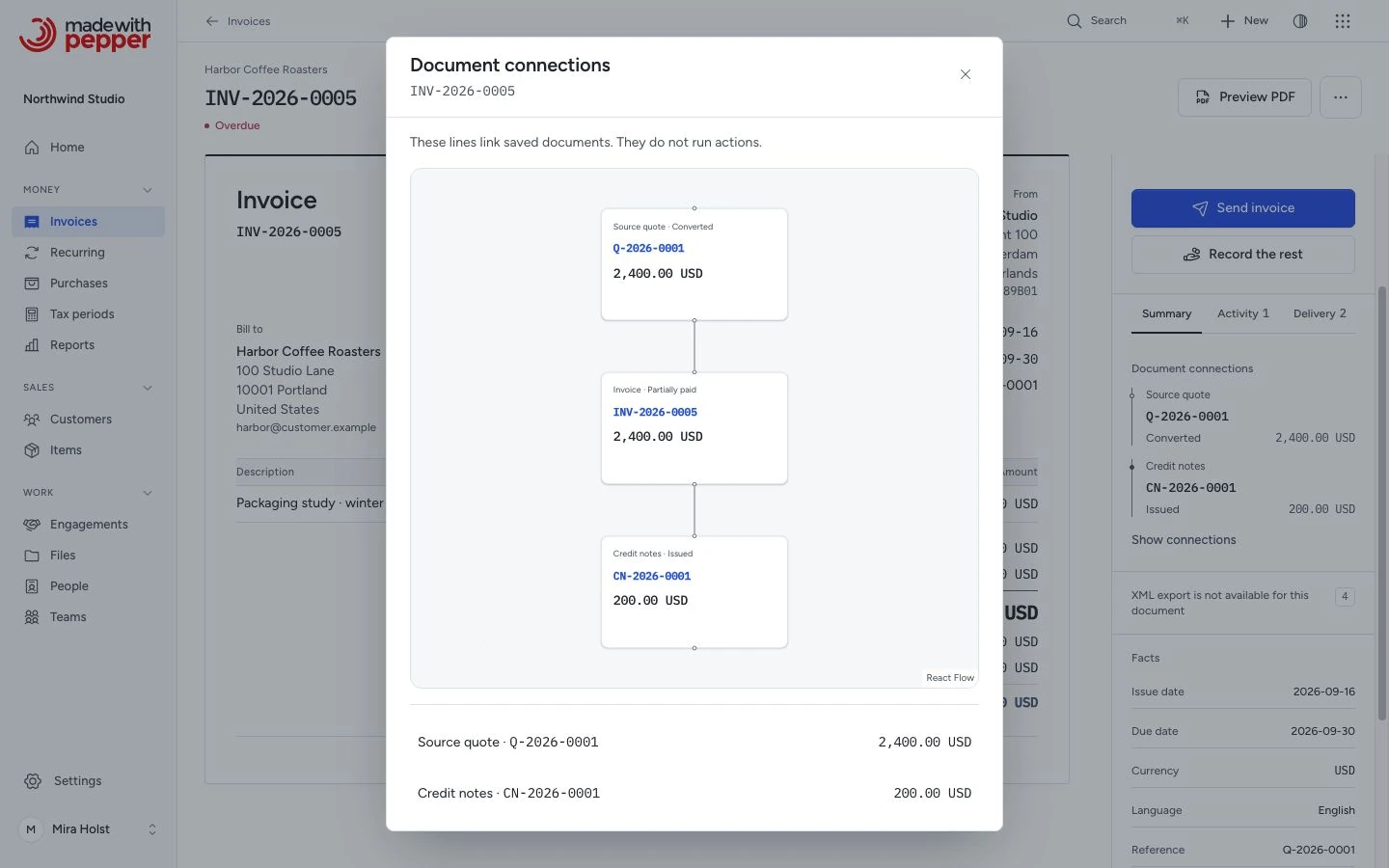
The connection diagram reads from top to bottom: source quote, invoice, then credit notes. The list below it links to the same records. These are saved relationships; opening the diagram does not run a financial action.
The transaction timeline
A typical transaction moves through these stages:
Quote → customer agrees → Invoice → customer pays → done.
If something goes wrong after invoicing, a credit note reverses part or all of the charge.
flowchart TD
    accTitle: From an accepted quote to invoice records
    accDescr: An accepted quote can create an invoice draft. After review and issue, payments reduce the invoice balance. A linked credit note can correct part or all of the charge when needed.
    quote["`Accepted
quote`"] -->|Convert to invoice| draft["`Invoice
draft`"]
    draft -->|Review and issue| invoice["`Issued
invoice`"]
    invoice -->|Record payment| payment["`Payment against
the invoice`"]
    invoice -->|Correct a charge| credit["`Linked
credit note`"]
Not every transaction needs all stages. Many freelancers skip quotes and send invoices. You can use pro-formas for specific situations.
When to use each type
Quote. Send a quote when you want to propose a price before committing. A quote’s legal effect depends on its terms and acceptance. Pepper does not count quotes toward receivables. Use them for project proposals, estimates, or pricing confirmations.
Northwind Studio sends Globex GmbH a quote for a brand identity project: Q-2026-0001, €18,500 plus VAT, valid for 30 days. Globex accepts the quote on its public page. Mira clicks Convert to invoice, and Pepper creates a draft invoice with the same line items.
The Convert to invoice button appears only on an accepted quote that has no invoice yet. Conversion sets the quote status to converted.
Pro-forma invoice. Use a pro-forma for customs, prepayment requests or import/export paperwork that needs a preliminary invoice. It is not a tax invoice. Pro-formas have their own numbering sequence (PF prefix) and do not accept payments. When you deliver, Convert to invoice creates a linked draft invoice from the issued pro-forma, once. See Pro-forma invoices.
Invoice. The standard sales invoice. Send it after delivering goods or services. The invoice records your payment request and due date under the agreement with your customer. Invoices accept payment recording and appear in the money figures on Home.
Credit note. A credit note reverses part or all of an issued invoice. Use it for an overcharge, returned goods or a discount agreed after sending the invoice.
You can issue credit notes only from an issued invoice that is not cancelled. You cannot create them as standalone documents. Pepper copies the source invoice's line items into a credit note draft. Edit the draft for partial credits, then issue it. The credit note keeps the customer and the currency of its invoice.
An issued credit note lowers the balance due of its invoice at once. If the customer already paid, the invoice shows Credit owed. When you pay that money back, record a refund on the credit note. See Issue a credit note.
How documents link together
Pepper tracks three links. Each credit note links back to the invoice it credits. Each converted quote links to the invoice created from it. Each converted pro-forma links to the invoice created from it. The Summary tab of the inspector shows Document connections when the document has a link. The list names the source quote, the source pro forma, the converted invoice, the original invoice or the credit notes.
Issued documents do not change
When you issue a document, Pepper freezes its content and how it looks. The language, the PDF template, the brand color and the logo position stay as they were at issue. So do the number and date formats and the payment details, including the bank name. Later changes to settings, bank accounts, company details or customers apply to new documents only.
Pepper stores the first PDF after the issue as the issued original, with a SHA-256 fingerprint. It also stores the XML file of an invoice or credit note that passes the XML checks. Download PDF and Export XML give these stored files. Pepper never changes or deletes them.
A payment or a credit note does not change the original. Download current copy gives a PDF with the current Paid, Credited and Balance due rows. Each page of that copy says that it is not the issued original.
Example: Pine Street Bakery's invoice HL-2026-0014 has a total of $2,598.00. After a credit note of $324.75, its original PDF still shows $2,598.00. The current copy adds Credited $324.75 and Balance due $2,273.25. See Issued originals and downloads.
Worked example
Mira Holst at Northwind Studio works with Acme Hardware on a website project:
-
Quote Q-2026-0002 : Mira quotes 40 hours of design at €125/hour plus 20 hours of development at €135/hour. Total: €7,700 plus 21% VAT.
-
Acme accepts the quote. Mira clicks Convert to invoice, and Pepper creates a draft invoice with the quote's line items. She issues it as Invoice NW-2026-0004 and emails it. The Delivery tab shows Emailed when the mail server accepts the email.
-
After delivery, Acme reports that 4 development hours were not needed. Mira creates a credit note draft from NW-2026-0004. She edits the draft to keep only the development line and changes the quantity from 20 to 4. The credit note total is €653.40 (€540 plus 21% VAT). She issues it as Credit note CN-2026-0001 and emails it.
-
The invoice now shows Credited €653.40 and a Balance due of €8,663.60 (€9,317.00 minus €653.40). Its status is Partially paid. Acme pays €8,663.60, and Mira records the payment on NW-2026-0004. The status changes to Paid.
Pepper links the quote, the invoice, and the credit note. The invoice's Document connections panel shows the source quote and the credit note.
From quote to invoice
| Stage | What happens next |
|---|---|
| Quote draft | Review the quote before issuing it |
| Issued quote | The customer can accept it on its public page |
| Accepted quote | Convert to invoice creates a linked invoice draft |
| Invoice draft | Review and issue opens the confirmation before issuance |
| Issued invoice | Record payments you received. Create a linked credit note when a charge needs correction |
Related pages
Need help with the product?
Contact support