
Browse the manual
Configure document numbering
How to set up invoice, quote, and credit note numbering sequences with custom prefixes, formats, and year reset.
On this page
For: business owners setting up their numbering scheme. What you need: owner or admin access.
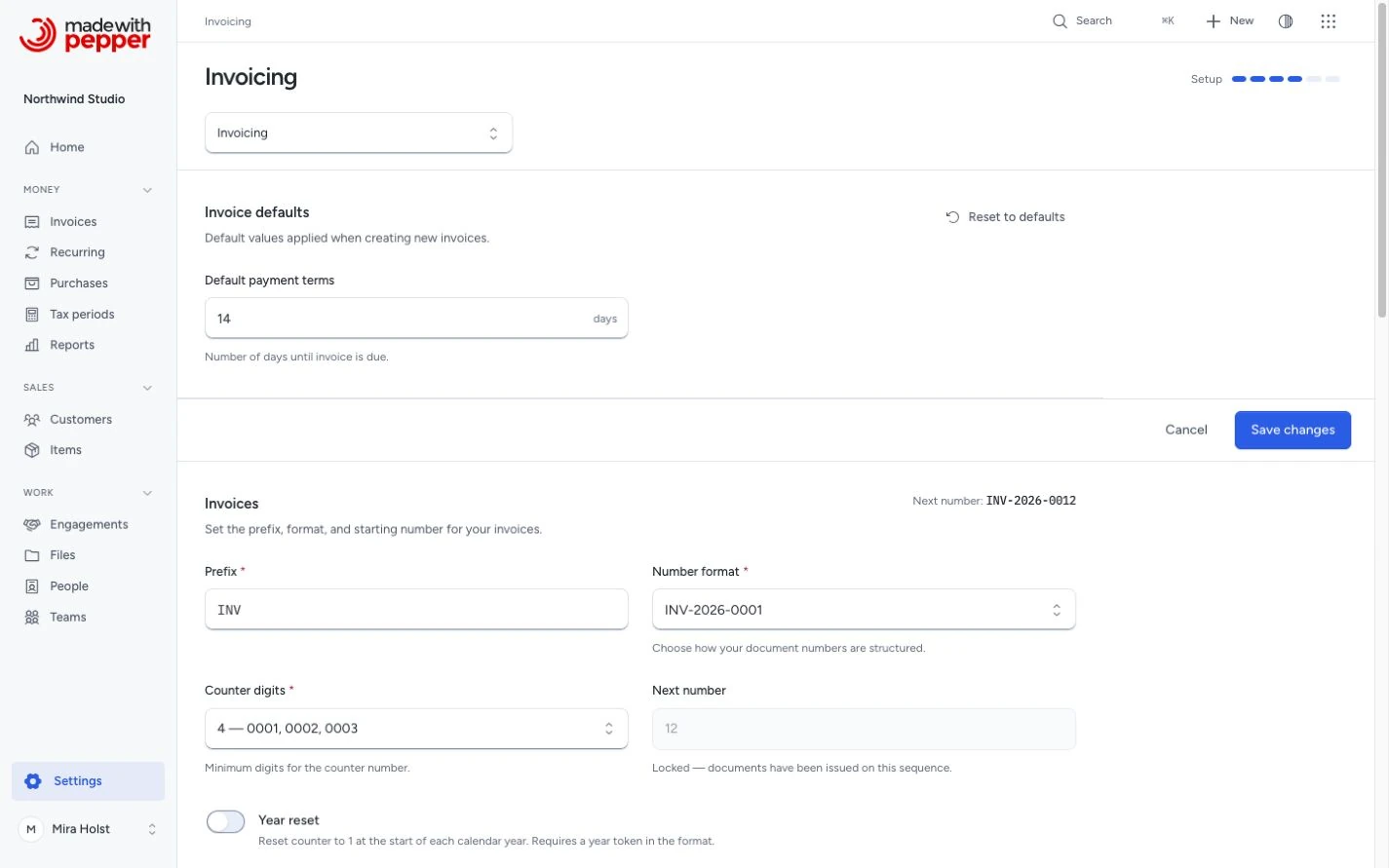
1. Go to invoicing settings
Go to Settings > Invoicing. You see a Document numbering section for each document type: invoices, credit notes, quotes, and pro-formas.
2. Set the prefix
Each document type has its own prefix. Defaults:
| Type | Default prefix |
|---|---|
| Invoice | INV |
| Credit Note | CN |
| Quote | Q |
| Pro-Forma | PF |
Change the prefix to match your business convention. For example, Northwind Studio uses "NW" for invoices.
3. Choose a format
Pick from six patterns:
| Pattern | Example |
|---|---|
{PREFIX}-{YYYY}-{#} |
NW-2026-001 |
{PREFIX}-{YY}{MM}-{#} |
NW-2605-001 |
{PREFIX}-{#} |
NW-001 |
{PREFIX}{YYYY}{#} |
NW2026001 |
{PREFIX}/{YYYY}/{#} |
NW/2026/001 |
{YYYY}-{#} |
2026-001 |
The live preview at the bottom of each section updates as you change settings.
4. Set counter padding
Control the minimum number of digits: 1 (no padding), 3 (001), 4 (0001), up to 6 (000001). The counter always grows beyond the padding if needed.
5. Set the starting number
The starting number is the counter of the first document you issue in the sequence. The default is 1.
If you move from another tool and your last invoice was 247, set the starting number to 248. The field locks when you save a starting number above 1. It also locks when you issue the first document in the sequence. Pepper then advances the counter by one for each finalized document.
You cannot choose a number for one document when you issue it. The draft sheet shows the expected number as a preview only.
6. Year reset (optional)
Disabled by default. Enable to reset the counter to 1 at the start of each calendar year. This requires a year token in your chosen format pattern.
With year reset enabled: NW-2026-001, NW-2026-002, ... NW-2027-001 (resets). Without year reset: NW-2026-001, NW-2026-002, ... NW-2027-003 (continues).
What can go wrong
- Starting number is locked. You saved a starting number above 1, or you issued the first document in the sequence. Pepper refuses a new starting number and keeps the current counter.
- Issue date refused. Issue refuses an issue date later than today or earlier than the latest issue date in the sequence. The error names the date you can use. See Issue dates.
- Year reset without year token. Year reset requires a format that includes a year component. The UI prevents invalid combinations.
Related pages
Need help with the product?
Contact support