
Browse the manual
Configure payment reminders
Set up automatic and manual payment reminders in Pepper. Configure reminder stages, per-customer overrides, and the per-invoice cap.
On this page
Pepper sends payment reminders for invoices that are approaching their due date or past due. Four fixed stages apply to all customers. You can turn automatic reminders on or off, set a per-invoice cap, and override the stages per customer.
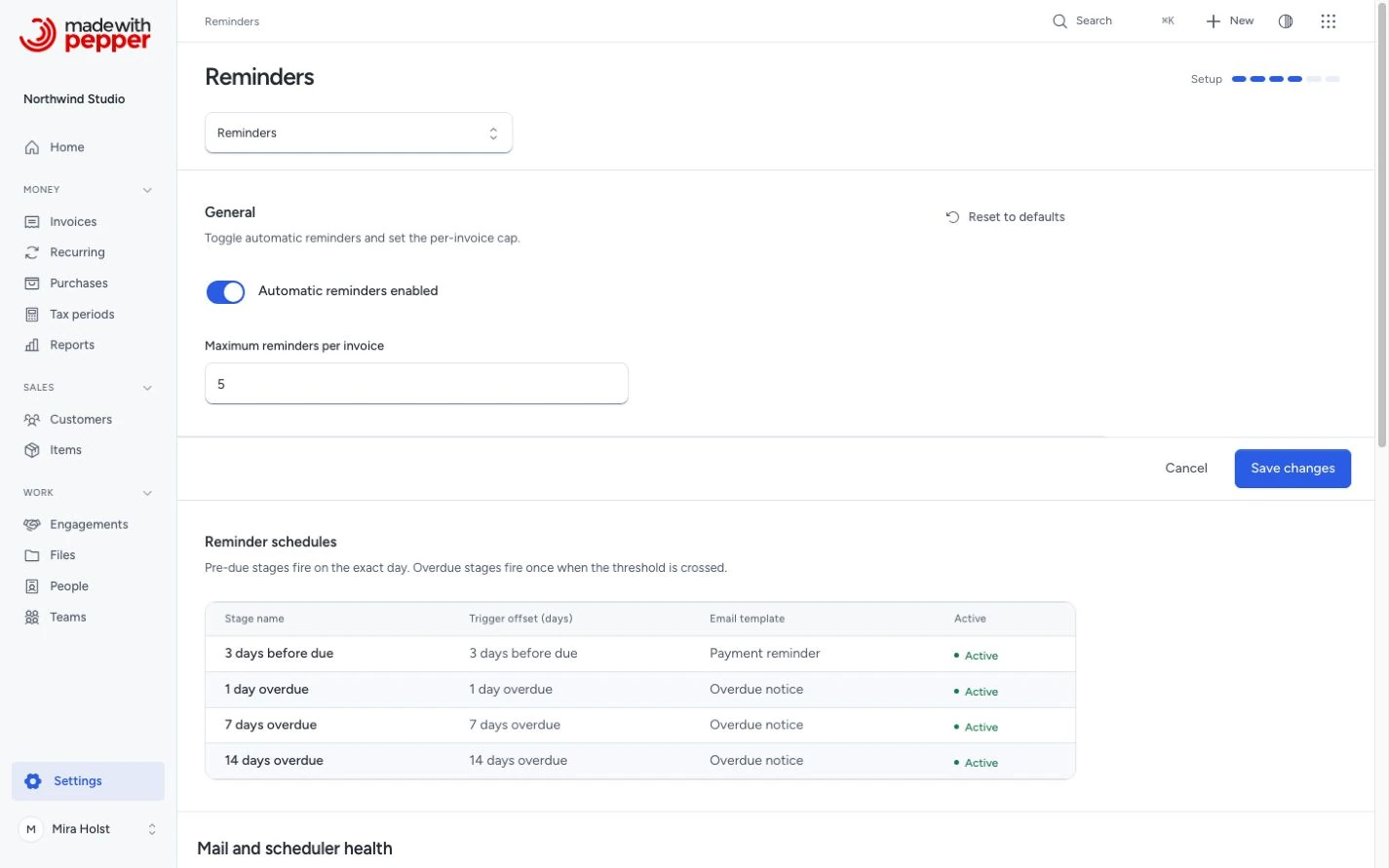
How reminder stages work
Each reminder stage defines a trigger offset from the invoice due date. Settings > Reminders lists the stages but does not let you edit them:
| Stage | Trigger | Template used |
|---|---|---|
| 3 days before due | -3 days | Payment reminder |
| 1 day overdue | +1 day | Overdue notice |
| 7 days overdue | +7 days | Overdue notice |
| 14 days overdue | +14 days | Overdue notice |
Pepper sends pre-due reminders on the exact day. It sends overdue reminders once per stage after the invoice crosses the threshold. It never sends the same stage twice for an invoice.
If your server was offline and missed several overdue stages, the first run after recovery queues only the latest eligible stage. For example, at 15 days overdue it chooses +14 and skips +1 and +7. Each invoice can queue one automatic reminder per business date. Pending or unknown results block later stages. A delayed reminder accepted today also uses today’s limit.
When reminders are sent
Pepper runs reminders:send every day at 07:00 in the Business timezone. It chooses the latest eligible active stage for each invoice:
- Automatic reminders enabled is on in Settings > Reminders.
- The invoice is issued, not cancelled and has a balance due above zero. A partially paid invoice matches.
- Someone emailed the invoice, or recorded a delivery with Record delivery.
- Reminders for the invoice are not paused.
- The due date matches the stage trigger. For the stage before the due date, the due date is exactly 3 days after today. For an overdue stage, the invoice is overdue and its due date is at least the trigger's number of days before today.
- No previous automatic reminder exists for that stage on that invoice.
- The invoice has not reached the reminder cap.
- The customer has not disabled or excluded the stage.
- A recipient exists. See Recipient resolution.
Pepper queues each reminder and tries to send it at once. A temporary failure gets the same retries as any other email. Before each attempt, Pepper checks the invoice again. If nothing is due any more, it sends nothing and the reminder does not count.
"Today" is the date in the Business timezone of Settings > Company. The 07:00 run uses that timezone too.
Recipient resolution
Reminder emails use the Receives reminders flag on customer contacts:
- Reminder contacts: every active contact with Receives reminders.
- Customer email: if no active contact has the flag, the customer's email address. Pepper skips it when an active contact with the same address turned Receives reminders off.
There is no other fallback. The primary billing contact gets a reminder only when it has Receives reminders. With no recipient, Pepper queues nothing. The invoice page shows "No reminder recipient. Turn on Receives reminders for a contact, or add an email address to the customer."
Per-customer override
Each customer record has a Reminder schedule section on the create and edit forms with three options:
- Use global schedule (default): follow the company-wide stages from Settings.
- Custom stages only: select specific trigger offsets from the active stages. Pepper sends reminders for this customer only at the checked stages.
- No automatic reminders: disable all automatic reminders for this customer.
Manual reminders remain available regardless of the override setting.
Reminder cap
By default, Pepper stops automatic reminders after 5 per invoice. The cap counts automatic reminders only: the ones the mail server accepted and the ones that still wait. Manual reminders do not use up the cap. When the automatic reminders reach the cap:
- The Activity tab shows that automatic reminders are paused.
- After raising the cap, open the invoice’s Activity tab and click Resume. This preserves the count and earlier stage records. It permits only a later eligible stage.
- Automatic reminders stop for that invoice.
- Manual reminders remain available.
You can change the cap in Settings > Reminders > Maximum reminders per invoice.
Send a manual reminder
Open an issued invoice with a balance due. On a phone, open Details.
- Click Send reminder.
- Review the customer, recipients, template and current balance due.
- Read any warning about an invoice that was never emailed.
- Click Send reminder in the review dialog.
Opening the review sends nothing. A Home reminder action opens the invoice and the same review. A refused send keeps the dialog and gives the reason. Read the result before trying again.
The review uses Overdue notice after the due date, and Payment reminder on or before it. Pepper rechecks recipients and balance before sending.
A manual reminder adds one to the reminder count when the mail server accepts it. It does not use up the cap, and the cap does not block it. If nobody emailed the invoice yet, the confirmation says "This invoice was never emailed. The reminder also attaches the invoice."
Reminder log
Every invoice shows Reminders on the Activity tab of its inspector. It lists the reminders that the mail server accepted. Each entry records:
- Sent: the date and time in the company format
- Stage (e.g., "7 days overdue")
- Recipients (email addresses)
- Type (auto or manual)
Use Pause or Resume under Reminders on this tab. Resuming does not clear the count, pending results or earlier stages.
Worked example: Northwind Studio
Northwind Studio emails invoice INV-2026-0042 for €1,210.00 to Van der Berg Design on May 1, due May 31. The mail server accepts it, so the Delivery tab shows Emailed.
| Date | Event |
|---|---|
| May 28 | Payment reminder (3 days before due) to sophie@vanderbergdesign.nl. {amount_due} is €1,210.00 |
| Jun 1 | Overdue notice (1 day overdue) |
| Jun 5 | Van der Berg pays €610.00. Northwind records the payment |
| Jun 7 | Overdue notice (7 days overdue). {amount_due} is €600.00 |
| Jun 14 | Overdue notice (14 days overdue). Reminder count: 4 |
| Jun 16 | No action. No stage comes after 14 days |
If the invoice still has a balance due and Northwind sends a manual reminder on Jun 20, the count becomes 5. The cap counts the 4 automatic reminders only, so automatic reminders do not pause.
The same rules apply in any currency. A reminder for a $2,598.00 invoice with $324.75 credited asks for $2,273.25.
The scheduler runs reminders:send via php artisan schedule:run (every day at 07:00). The outbox:process command sends the queued reminders every minute. You do not need a separate schedule for it. See CLI commands for cron setup.
To run it yourself for testing or after downtime:
php artisan reminders:send
Need help with the product?
Contact support