
Browse the manual
Pro-forma invoices
Create, issue and send pro-forma invoices as preliminary documents, then convert one to a linked draft invoice.
On this page
Where: Invoices in the navigation, then Views > Pro-forma Who: owners and admins create, edit, issue, send, convert and cancel pro-formas. Employees do the same for pro-formas they created and see only their own. Accountants can view and download pro-formas but cannot change them. A user without access gets a 403 error page.
You send a pro-forma invoice before delivery or payment. It shows your customer what you will charge. It creates no receivable in Pepper. Pro-forma invoices do not accept payments and count in no money figure on Home.
| Current state | Action | Result |
|---|---|---|
| Draft | Review and issue the pro-forma | Issued, with a permanent number from the pro-forma sequence |
| Issued | Confirm Send pro-forma | The pro-forma stays Issued. The delivery state records the email result |
| Issued, not yet converted | Confirm Convert to invoice | One linked invoice draft is created. The pro-forma stays Issued |
| Issued | Confirm Cancel pro-forma | Cancelled, with its number preserved |
The default number prefix is PF. Conversion is available only once.
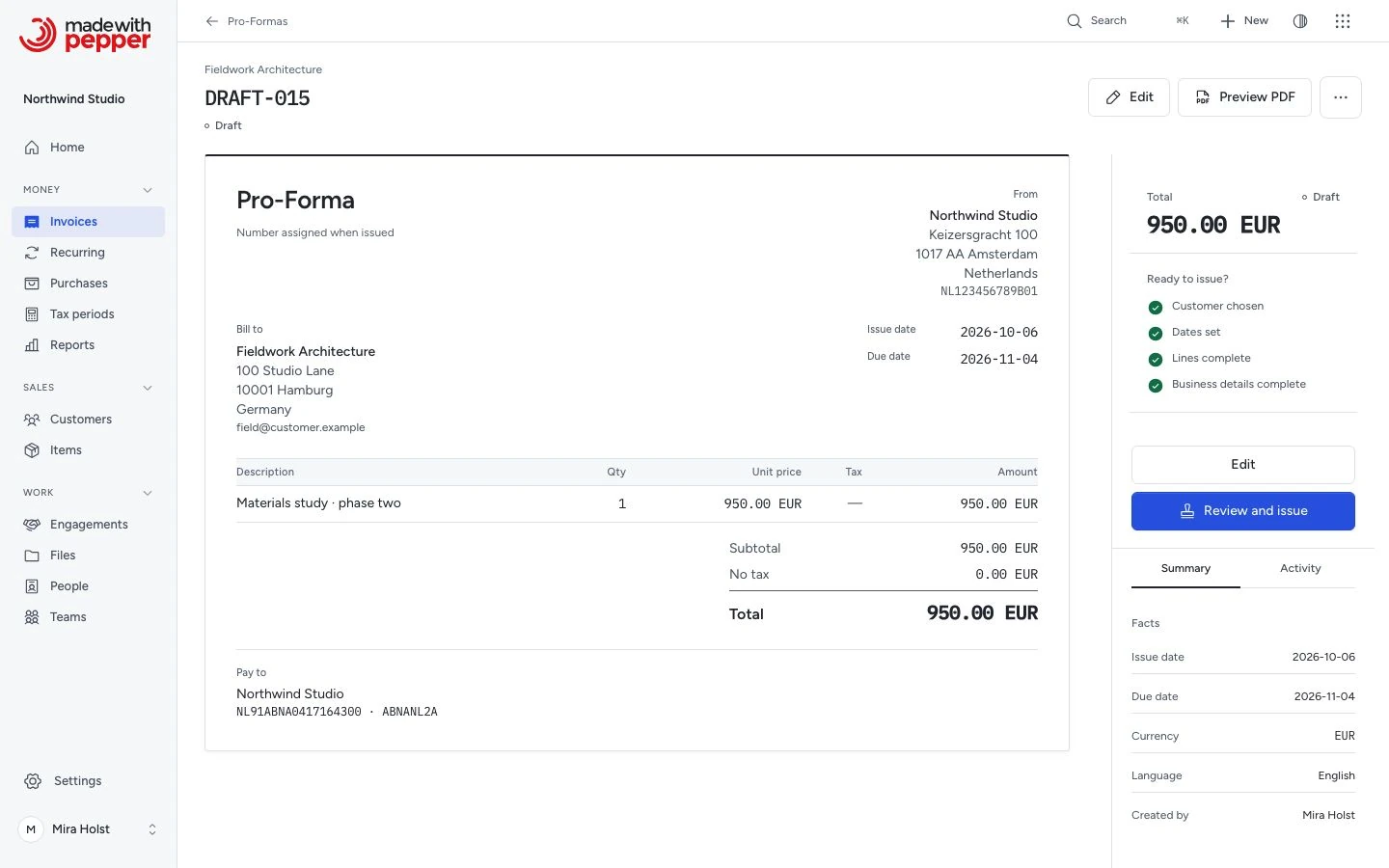
Creating a pro-forma
- Click Invoices in the navigation.
- Open Views in the global bar.
- Choose Pro-forma.
- Click New pro-forma.
- Choose the customer under Bill to, or create one with New customer.
- Set the Issue date, the Due date and the Currency.
- Add lines by hand or with Add from catalog.
- Click Save draft.
- When the checklist shows "4 of 4 ready", click Review and issue.
- In the dialog "Issue this pro-forma?", click Issue pro-forma.
The sheet is the same workspace as an invoice. The document number uses the PF prefix from your configured numbering sequence.
Issuing does not email the pro-forma. Its status shows Issued. Click Send pro-forma to email it. The dialog and the Delivery tab work the same as for invoices.
Pro-forma lifecycle
| Status | Description |
|---|---|
| Draft | Editable, no number assigned yet |
| Issued | Issued with a permanent PF number. The Delivery tab shows whether anyone emailed it. A converted pro-forma keeps this status and names its invoice |
| Cancelled | Voided. Number preserved for the audit trail |
Pro-formas do not have Paid or Partially paid statuses because they do not accept payments. The Paid view of the pro-forma list therefore stays empty.
The pro-forma PDF shows the same totals rows as an invoice PDF, without Paid and Balance due. A pro-forma never carries an EPC QR code, also when it is in EUR and has a bank account selected.
Actions
The header of an issued pro-forma has Preview PDF and More actions, the button with three dots. The panel on the right offers the next step.
| Action | Where | Description |
|---|---|---|
| Preview PDF | Header | View the PDF in your browser |
| Download PDF | Right panel and More actions | Download the issued original PDF. A draft gives a live preview |
| Send pro-forma | Right panel and More actions | Email the issued original PDF to the customer |
| Record delivery | Delivery tab | Record that the customer got the pro-forma another way. Pepper sends nothing |
| Convert to invoice | More actions | Create a linked draft invoice from an issued pro-forma. Offered once. See below |
| Duplicate | More actions | Create a new pro-forma draft from this one, whatever its status. The copy rules are the same as for invoices: new dates, no number, totals calculated again |
| Cancel pro-forma | More actions | Void an issued pro-forma after you confirm. No reason is asked or stored |
| Delete draft | More actions | Delete a draft. Only a draft offers it |
Convert to an invoice
When you deliver and want to collect payment, convert the pro-forma. An issued pro-forma that is not cancelled offers Convert to invoice once.
- Open the pro-forma.
- Click More actions.
- Click Convert to invoice.
- In the dialog "Convert PF-2026-0003 to an invoice?", click Convert to invoice.
Pepper creates a draft invoice and opens it in the editor. The message reads "Pro forma converted. A draft invoice has been created." The draft copies the customer, currency, language, notes, internal notes and tags. It also copies the bank account and PDF template. It copies every line with its saved tax rate. The Reference is the pro-forma number.
The issue date is today, and the due date follows your default payment terms. Pepper calculates the totals again.
The pro-forma keeps the status Issued. Its row in the list reads "Converted to INV-2026-0021" once the invoice is issued, or shows the draft code before that. Its Summary tab lists the Converted invoice under Document connections, and the invoice lists the Source pro forma. Convert to invoice then no longer shows on the pro-forma.
Example: Harbor Lane Studio in Portland issues PF-2026-0003 for $1,800.00 of website design before the work starts. After delivery, Dana converts it. The draft invoice holds the same line, $1,800.00 plus sales tax, with the reference PF-2026-0003. Northwind Studio in Utrecht does the same for a €2,420.00 pro-forma with 21% VAT.
If someone else converted the pro-forma first, Pepper refuses the request. The message reads "This pro forma has already been converted to an invoice."
A draft or a cancelled pro-forma has no Convert to invoice. Pepper refuses such a request with "Only an issued pro forma that is not cancelled can be converted to an invoice."
Related pages
Need help with the product?
Contact support